

A hard-wired Ethernet cable is a reliable way to connect a garden office. Use outdoor-rated cable protected in conduit if it runs underground. If you’re weighing up how to get internet to a garden office without a cable, point-to-point Wi-Fi can link the buildings when there’s a clear line of sight.
A weak signal at the end of the garden can interrupt video calls, slow browsing and make streaming frustrating. The best option depends on the distance, obstacles between the house and office, and how you plan to use the connection.
This guide explains how to plan an Ethernet run, when point-to-point Wi-Fi may suit, and how to assess signal strength for everyday browsing or higher-bandwidth activities. You’ll also see where extenders and mesh systems fit, helping you choose a dependable connection for your garden workspace.
Key Takeaways
- Plan a protected, outdoor-grade Ethernet route, ideally alongside other installation work, for a direct wired connection.
- Consider point-to-point Wi-Fi when the buildings have a clear line of sight, and account for trees or outbuildings that could obstruct the signal.
- Measure signal strength where you’ll work: browsing and streaming place different demands on the connection.
- When planning a bespoke garden office, consider internet access alongside its layout and intended use.
1. How do I install Ethernet cable to my garden building?
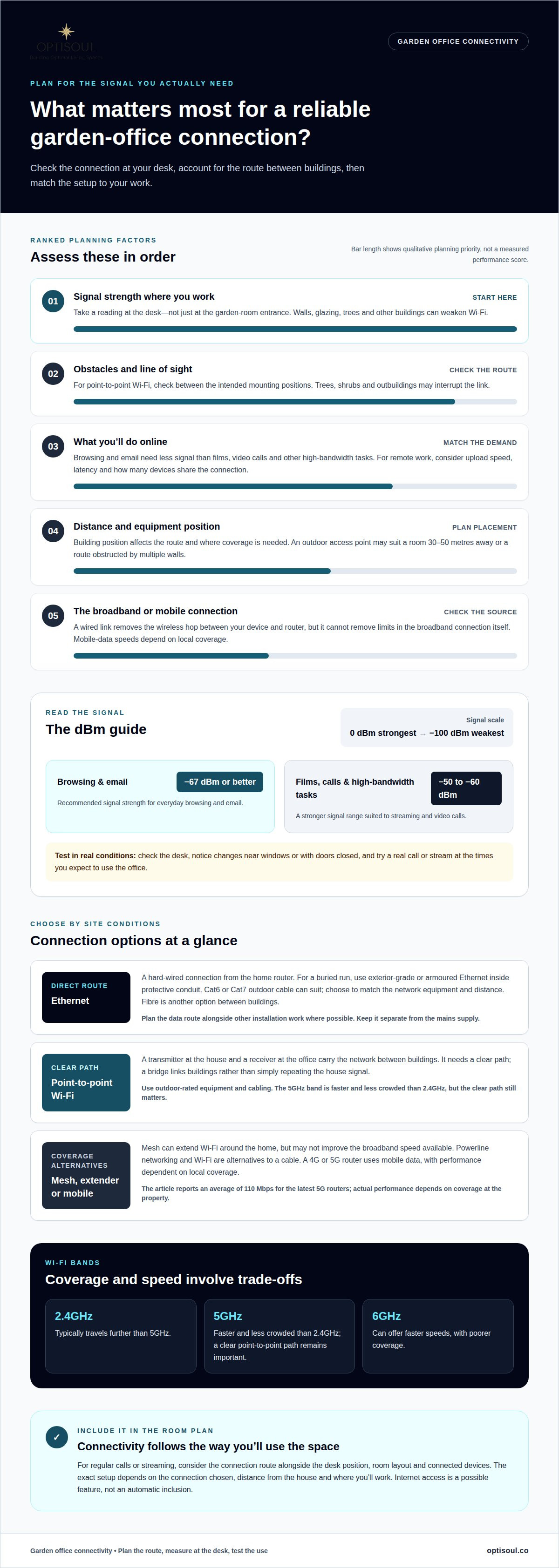
A practical answer to how to get internet to a garden office is to run Ethernet from the home router, with powerline networking or Wi-Fi as alternatives. First, map the route from router to office, including entry points and where devices will sit. If electrical work is planned, arrange the data route at the same time to avoid retrofitting later.
For a buried run, use exterior-grade or armoured Ethernet cable inside protective conduit. Cat6 or Cat7 outdoor cable is suitable for a hard-wired garden-room connection; choose the category to match the network equipment and distance. Fibre is another option between buildings, particularly where the route or performance needs favour it. Ethernet is generally the simpler choice for connecting a router to a nearby device, while fibre carries data as light through a separate cable.
A cable trench does not have one universal planning or Building Regulations answer. Planning considerations depend on the property’s restrictions and whether the trench is part of wider development. Building Regulations are separate and may apply to associated electrical or building work. Before digging, consider the route, ground surface and any protected status.
Keep the data-cable plan separate from the mains supply. A qualified electrician should carry out electrical installation and assess the supply arrangements. If the building has a separate power circuit and uses wired Ethernet, a surge protector is advised. Avoid damaging existing services when digging, and test the connection at the office end before concealing cable entries or completing finishes.
2. Point-to-point wi-fi between buildings
A point-to-point link uses a transmitter at the house and a receiver at the garden office to carry the network between buildings. Before choosing equipment, check from the intended mounting positions whether you can see from one unit to the other. Trees, shrubs and outbuildings in the path may interrupt the wireless link, so assess the route at mounting height, not just from ground level.
Connect the house-side unit to the router, then position the receiver at the office and connect it to a device or local access point. Follow the kit’s setup instructions to pair and align the units. Use a laptop at the office to test the connection after setup. Keep the units accessible so their alignment and connections can be checked later.
Use outdoor-rated equipment and cabling, installed to withstand exposure to the elements. Protect cable entry points and arrange the route to avoid unnecessary bends or strain. The 5GHz band is faster and less crowded than 2.4GHz, but a clear path between the units remains important. A point-to-point bridge carries a link between buildings; it isn’t simply an extender repeating the house signal.
An outdoor access point may be suitable where a garden room is 30-50 metres away or multiple walls obstruct the route. Choose between these approaches by considering building position, obstacles and where devices need coverage. After installation, test the connection in the places you’ll use it, including the desk, rather than relying solely on the signal at the receiver.
3. Signal strength for browsing and streaming
Wi-Fi weakens as it travels from the house because distance, walls, glazing, trees and other buildings can obstruct the signal. A router that works well indoors may struggle in a detached office, especially during video calls or streaming. Check reception at the desk rather than assuming the signal at the garden-room entrance represents the whole space.
Signal readings use dBm, from 0 dBm, the strongest, to -100 dBm, the weakest. Around -67 dBm or better is recommended for browsing and email; around -50 to -60 dBm suits films, video calls and other high-bandwidth tasks. Test where you’ll sit, and note whether the reading changes near windows or when doors are closed.
A 4G or 5G router can provide internet through mobile data, with speeds dependent on local mobile coverage. Test mobile reception inside the proposed office before settling on its position. The latest 5G routers average 110 Mbps, though actual performance depends on coverage at the property. Broadband performance also varies with household use and the connection itself.
For calls and remote work, consider upload speed as well as download speed, and how many devices share the connection. Latency affects how quickly a call responds. A wired link removes the wireless hop between your device and router, but the broadband connection still affects call quality.
For Wi-Fi, 2.4GHz typically travels further than 5GHz, while 6GHz can offer faster speeds with poorer coverage. Mesh systems can help extend Wi-Fi coverage around the home, but they may not improve the broadband speed available. Test the setup during a real call or stream at the times you expect to use the office.
Optisoul Garden Rooms and Outdoor Living Spaces: Bespoke Garden Offices
Optisoul Garden Rooms and Outdoor Living Spaces designs bespoke garden offices around your property, available space and intended use. If you’re planning regular video calls or streaming, include connectivity in the brief alongside the desk position and room layout.
A considered plan can allow for internet as a feature, with the route and equipment positions coordinated with the room’s design. The exact setup depends on your chosen connection, the distance from the house and where you’ll work. Internet is a possible feature, not an automatic inclusion.
Optisoul also creates bespoke garden rooms for uses beyond work, with each design tailored to its setting and purpose. Share how you expect to use the space and what you know about the site, then discuss a design that brings those practical details together.
Contact Optisoul Garden Rooms and Outdoor Living Spaces to discuss your garden-room plans.
Plan the room around the way you’ll use it
Choosing how to get internet to a garden office is part of a broader design decision. Consider where you’ll work, take calls and place connected devices. Thinking about these routines early helps the room’s layout and connection plan work together, rather than treating connectivity as an afterthought.
Optisoul creates bespoke garden offices, garden gyms and garden rooms, shaped around their intended use and available space. Whether the room is for focused work, exercise or another daily routine, those priorities can guide the design conversation.
Share your plans, intended use and site details with Optisoul Garden Rooms and Outdoor Living Spaces to explore a considered design for your garden. A clear brief is a useful first step towards a space that feels ready for the way you want to use it.
Frequently Asked Questions
How do I install an ethernet cable to my garden building?
Plan the cable route from the router to the desk or access point before installation. Measure the full path, including where the cable enters each building, and choose a route away from areas likely to be disturbed by later work. Once connected, test the link at the office end before closing access points or finishing the room, so faults are easier to locate.
How do I extend WiFi to my garden?
First, try moving the home router to a higher, less obstructed position facing the garden. If the signal still fades, place a Wi-Fi extender where it receives a usable signal from the router, then test coverage at the garden’s intended seating or working spot. For equipment exposed outdoors, choose an outdoor-rated model. Restarting the router may also prompt it to select a less crowded channel.
Wired or wireless?
Choose wired Ethernet for a direct connection to a desktop computer or video-call setup if you can plan a cable route. Wireless avoids running a physical data cable across the garden, but depends on signal conditions between the house and office. A clear path may suit a point-to-point link, while trees or several walls can make a direct wireless connection less suitable.
Can I extend my home Wi-Fi to a garden office, and what range can I expect?
Yes, an extender can carry your home Wi-Fi towards a garden office, with its effective range shaped by walls, glazing, trees and interference. Extenders can work over around 30 metres, but that figure isn’t a promise of usable coverage at the far end. Test the connection at the actual desk, and try the 2.4GHz band if 5GHz coverage falls short.
How do I install a point-to-point Wi-Fi bridge between a house and garden office?
Fit an outdoor unit at the house and its paired receiver at the office, aiming them along a clear path. Connect the house unit to the router, then connect the receiver to an office access point or device. Follow the kit’s instructions to pair and align the units, then test the connection indoors where you’ll use your laptop.

Article by
Creig Franklin Rainbow Anderzon
Creig Franklin Rainbow Anderzon is the founder of Optisoul and a highly experienced builder and qualified carpenter with over 30 years in the construction industry. He specialises in designing and building bespoke garden rooms across Surrey, combining practical building knowledge with a strong eye for detail, quality craftsmanship and long-lasting finishes.
Disclaimer
Please note: This article provides general guidance only. Planning permission, permitted development rights, building regulations, costs and site requirements can vary depending on the property, location and proposed use. Always seek advice specific to your project from your local planning authority or a suitably qualified professional.
For advice about a bespoke garden room in Surrey, contact Optisoul to arrange a site survey.


